How Fast Is Get Component?
Introduction
While learning Unity, we will come across information to use the GetComponent method wisely, as it is quite a slow piece of code. We should also avoid placing this method in the Update method. In this post, I would like to focus on this issue and check as reliably as possible the real speed of execution of this method by our computer.
What does GetComponent do?
The GetComponent method allows us to retrieve the first found component located on the specified object. It is also possible to call it directly inside the code of the component we are programming, because it is also available in the Component class, which is the base class for each component. This method comes in two variants.
1
2
3
4
5
6
7
8
9
10
11
12
13
14
15
private GameObject test;

public void Foo1()
{
  test.GetComponent<Type>();

  test.GetComponent("Type");
}

public void Foo2()
{
  this.GetComponent<Type>();

  this.GetComponent("Type");
}
Assumptions
To perform the test, we need several assumptions that will make it as accurate as possible.
- We will use System.Diagnostics.Stopwatch to measure the execution time of the method.
- The next issue is how we will print the result of our measurements. We want to avoid using the Debug.Log method at all costs, as it is very slow and could skew the results. Instead, we will draw the result directly on the screen using GUI.Label.
- To create more complex information, we will have to put together several strings. Unfortunately, such an operation will lead to multiple allocation of them. For this reason, we will use the System.Text.StringBuilder class. Its implementation stores characters in an internal buffer and will not allocate new memory as long as we do not exceed its capacity. Thanks to this, we can easily reuse the object once created in subsequent tests without the Garbage Collector overhead, because the buffer size will be similar or the same in subsequent iterations.
- The last thing is the overhead we receive from the editor, which we get rid of by performing tests on the built version of the application.
We will test the method as follows
- Calling one GetComponent method in both variants. We will do this to show that this time will be ultra short, proving that one call (or several) is not harmful to performance.
- Calling 200000 GetComponent methods in both variants. This test should show how much performance is affected by the aggregated number of these methods. This is a common situation, especially in large projects.
- Repeating step two when the desired component is at the bottom of the component hierarchy. Considering that this may affect the efficiency of the method (since it returns the first component found), we want to check how big the difference will be.
- Repeating the second step when we select the interface as the component we want to get (the component itself will also be in the last place in the component hierarchy)
Test preparation
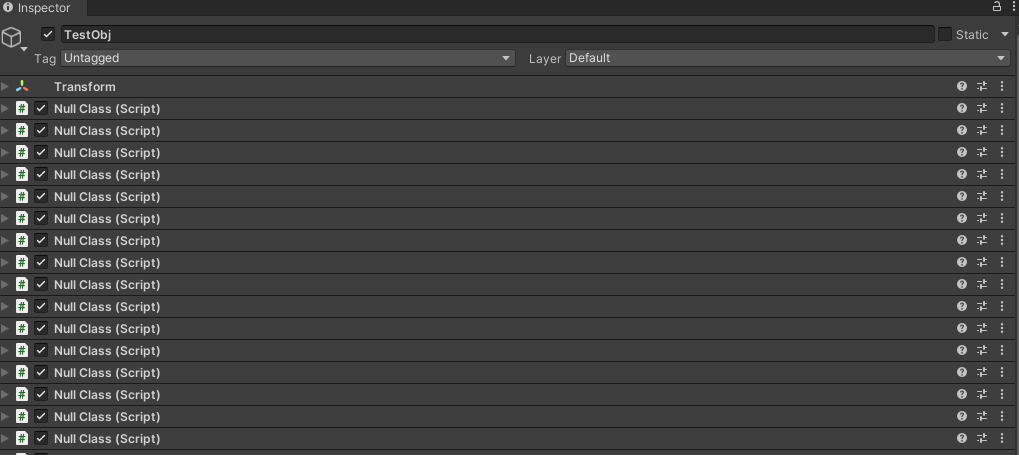
For testing purposes, I prepared an object with 52 components.
 **
**
In the first two tests, we will get the Transform component, which is at the very top of the hierarchy. In the remaining tests, we will use the component that is located 52nd in the hierarchy, i.e. at the very bottom. Then we will compare the obtained times.
The last step is to prepare the build. In order to minimize the graphical overhead, the game will be run in windowed mode with the most efficient graphics settings. The window will have a resolution of 640×480.
The test was performed in the following environment:
- Intel i9-12900K 3.20 GHz
- Windows 11 Pro 22H2
- Unity 2022.3.0, Intel 64-bit, Non-developer build
- 640×480, Ultra Quality, Windowed
Results
Case 1: One call; component at the top of the hierarchy
| Method | Execution time |
|---|---|
| Type | 0.0009 ms |
| String | 0.0011 ms |
Case 2: 200000 calls; component at the top of the hierarchy
| Method | Execution time |
|---|---|
| Type | 11 ms |
| String | 19 ms |
Case 3: 200000 calls; component 52 in the hierarchy
| Method | Execution time |
|---|---|
| Type | 145 ms |
| String | 158 ms |
Case 4: 200000 calls; component 52 in the hierarchy; call to the interface, not the component class
| Method | Execution time |
|---|---|
| Type | 144 ms |
| String | 1360 ms |
Summary
As we can see in the case of one (or several) calls to the GetComponent method, even if we do it in the Update method, the execution time is completely negligible. It's only when the number of calls starts to increase dramatically that things start to get interesting. Since the method searches through a hierarchy of components, your place in that hierarchy has a huge impact on the final result. The example I chose is quite extreme, as we were dealing with as many as 52 components, but we can easily see that the dependence of place in the component hierarchy on execution time certainly exists and is worth taking into account.
The version using string as an argument lost in every comparison. In the best case, the difference is 8 and 13 milliseconds. Considering that a game running at 60 frames only has 16.67 milliseconds to generate an entire frame, this difference is significant, and we should definitely always choose to use the hard typed version whenever we can.
However, things get most interesting when we want to get a component using the interface instead of the component type. The difference then is huge, so we can certainly say that in this case, using hard typing is the only reasonable option.
I encourage you to comment in the comments if you have anything to add regarding the considerations made here
Test Code
1
2
3
4
5
6
7
8
9
10
11
12
13
14
15
16
17
18
19
20
21
22
23
24
25
26
27
28
29
30
31
32
33
34
35
36
37
38
39
40
41
42
43
44
45
46
47
48
49
50
51
52
53
54
55
56
57
58
59
60
61
62
63
64
65
66
67
68
69
70
71
72
73
74
75
76
77
78
79
80
81
82
83
84
85
86
87
88
89
90
91
92
93
94
95
96
97
98
99
100
101
102
103
104
105
106
107
108
109
110
111
112
113
114
115
116
117
118
119
120
121
122
123
124
125
126
127
128
129
130
131
132
133
134
135
136
137
138
using System.Diagnostics;
using System.Text;
using UnityEngine;

public class GetComponentSpeedTest : MonoBehaviour
{
    [SerializeField]
    private GameObject testObj;
    private Stopwatch sw;
    private StringBuilder sb;
    private Rect rect;

    private void Start()
    {
        Application.targetFrameRate = 60;
        sw = new Stopwatch();
        sb = new StringBuilder();
        rect = new Rect(0, 0, Screen.width, Screen.height);
    }

    private void OnGUI()
    {
        sb.Length = 0;
        sw.Reset();

        //case 1
        sw.Start();
        testObj.GetComponent<Transform>();
        sw.Stop();
        sb.Append("One call(Top)\n");
        sb.Append("Type Version(ms): ");
        sb.Append(sw.ElapsedMilliseconds);
        sb.Append("\nType Version(ticks): ");
        sb.Append(sw.ElapsedTicks);
        sw.Reset();

        sw.Start();
        testObj.GetComponent("Transform");
        sw.Stop();
        sb.Append("\nOne call(Top)\n");
        sb.Append("String Version(ms): ");
        sb.Append(sw.ElapsedMilliseconds);
        sb.Append("\nString Version(ticks): ");
        sb.Append(sw.ElapsedTicks);
        sw.Reset();
        sb.Append('\n');
        sb.Append('\n');

        //case2
        sw.Start();
        for (int i = 0; i < 200000; ++i)
        {
            testObj.GetComponent<Transform>();
        }
        sw.Stop();
        sb.Append("Multiple calls(Top)\n");
        sb.Append("Type Version(ms): ");
        sb.Append(sw.ElapsedMilliseconds);
        sb.Append("\nType Version(ticks): ");
        sb.Append(sw.ElapsedTicks);
        sw.Reset();

        sw.Start();
        for (int i = 0; i < 200000; ++i)
        {
            testObj.GetComponent("Transform");
        }
        sw.Stop();
        sb.Append("\nMultiple calls(Top)\n");
        sb.Append("String Version(ms): ");
        sb.Append(sw.ElapsedMilliseconds);
        sb.Append("\nString Version(ticks): ");
        sb.Append(sw.ElapsedTicks);
        sw.Reset();
        sb.Append('\n');
        sb.Append('\n');

        //case3
        sw.Start();
        for (int i = 0; i < 200000; ++i)
        {
            testObj.GetComponent<TargetClass>();
        }
        sw.Stop();
        sb.Append("Multiple calls(Bottom)\n");
        sb.Append("Type Version(ms): ");
        sb.Append(sw.ElapsedMilliseconds);
        sb.Append("\nType Version(ticks): ");
        sb.Append(sw.ElapsedTicks);
        sw.Reset();

        sw.Start();
        for (int i = 0; i < 200000; ++i)
        {
            testObj.GetComponent("TargetClass");
        }
        sw.Stop();
        sb.Append("\nMultiple calls(Bottom)\n");
        sb.Append("String Version(ms): ");
        sb.Append(sw.ElapsedMilliseconds);
        sb.Append("\nString Version(ticks): ");
        sb.Append(sw.ElapsedTicks);
        sw.Reset();
        sb.Append('\n');
        sb.Append('\n');

        //case4
        sw.Start();
        for (int i = 0; i < 200000; ++i)
        {
            testObj.GetComponent<ITest>();
        }
        sw.Stop();
        sb.Append("Multiple calls(Bottom)\n");
        sb.Append("Type Version(ms): ");
        sb.Append(sw.ElapsedMilliseconds);
        sb.Append("\nType Version(ticks): ");
        sb.Append(sw.ElapsedTicks);
        sw.Reset();

        sw.Start();
        for (int i = 0; i < 200000; ++i)
        {
            testObj.GetComponent($"ITest");
        }
        sw.Stop();
        sb.Append("\nMultiple calls(Bottom)\n");
        sb.Append("String Version(ms): ");
        sb.Append(sw.ElapsedMilliseconds);
        sb.Append("\nString Version(ticks): ");
        sb.Append(sw.ElapsedTicks);
        sw.Reset();
        sb.Append('\n');
        sb.Append('\n');

        GUI.Label(rect, sb.ToString());
    }
}
The inspiration for writing this article was the following entry: https://www.jacksondunstan.com/articles/2934
Published by

Comments powered by Disqus.