All You Need To Know About Flags
Introduction
In game development, we frequently need to represent multiple on/off states at the same time. A character may be running and jumping, an AI may be alert and hostile, or system may enable or disable certain gameplay features. While these can be represented using multiple boolean variables, there is more compact and flexible approach: flags
Flags are typically implemented using binary numbers and bitmasks. They allow multiple logical states to be stored inside a single numeric values. Both Unreal Engine and Unity provide native support for this pattern, but their workflows and tooling differ.
This article covers three layers of the topic:
- Binary numbers and how they map to flags
- How bitflags are used in code
- How Unreal Engine and Unity support them
By the end, we should understand not only how to use flags, but why they work.
Numeric Systems
To represent quantities, we use numeric systems (also called numeral systems).
Each system is defined by a finite set of digits and a base (also called radix). The base determines how many unique digits the system contains.
If a numeric system uses:
- 3 digits (0, 1, 2) → it is a ternary (base-3) system
- 4 digits (0, 1, 2, 3) → it is a quaternary (base-4) system
- 10 digits (0 - 9) → it is a decimal (base-10) system
The number of digits always equals the base of the system.
Different systems are used in different situations. We’ll focus on decimal and binary.
Decimal System (base-10)
The most natural system for humans is the decimal system. We use it every day four counting, measuring, and performing calculations.
The decimal system contains exactly ten digits:
0, 1, 2, 3, 4, 5, 6, 7, 8, 9
Limited Digits and Positional Notation
Every numeric system has a limited set of digits. Eventually, we run out of single-digit symbols. That is where positional notation becomes important.
When counting in decimal, we go:
… 7, 8, 9
After 9, there is no new digit available. We cannot invent a new symbol. Instead, we apply a simple rule:
- Reset the current digit to 0
- Increase the digit to the left by 1.
So: 9 → 10.
We did not create a new symbol. We created a new position.
Positional Structure in Base-10
Each position in a decimal number represents a power of 10.
From right to left:
- First position -> \(10^0\)
- Second position -> \(10^1\)
- Third position -> \(10^2\)
and so on
These powers describe how the positional structure works in base-10.
When we evaluate them numerically:
\[10^0 = 1\] \[10^1 = 10\] \[10^2 = 100\]In other words:
The positional rule comes from base-10
The numeric values are written in decimal because that is convenient to us.
Carry Mechanism
Let’s break it down:
\[9 = 9 * 10^0\] \[10 = 1 * 10^1 + 0 * 10^0\] \[11 = 1 * 10^1 + 1 * 10^0\]When we move from 9 to 10:
- The rightmost digit reaches its maximum value (9)
- Adding 1 causes it to reset to 0
- The position to the left increases by 1
The mechanism is called a carry.
This is how normal counting works:
8, 9, 10, 11, 12, 13, …, 19, 20
At 19 → 20 the same thing happens:
- 9 resets to 0
- 1 increases to 2
This carry mechanism is not unique to decimal. It happens in every numeric system, only the maximum digit changes.
Binary System (base-2)
Computers do not operate using ten distinct symbols. At the hardware level, digital circuits have only two stable states:
- Electrical signal present
- Electrical signal absent
We map these physical states to numbers:
- No signal → 0
- Signal present → 1
Because there are only two possible digits (0 and 1), computers use the binary system (base-2).
Counting in Binary
Binary follows the exact same rules as decimal. The only difference is the maximum digit.
In decimal, the largest digit is 9. In binary, the largest digit is 1.
Let’s count:
0, 1
Now we are out of digits.
So we apply the same rule:
- Reset the current digit to 0
- Carry 1 to the left
1 → 10
Again, we did not invent a new digit. We created a new position.
Continue counting:
0, 1, 10, 11, …
Now add 1 to 11:
- The rightmost digit (1) resets to 0
- It carries 1 to the left
- The left digit is also 1, so it resets to 0
- Another carry is produced
Result: 11 → 100
From Binary to Decimal
Just like the decimal system is based on powers of 10, binary system is based on power of 2. Each position in a binary number represents a power of 2.
From right to left:
- First position → \(2^0\)
- Second position → \(2^1\)
- Third position → \(2^2\)
- Fourth position → \(2^3\)
- Fifth position → \(2^4\)
and so on.
This is the structural rule of base-2
When we evaluate those powers:
\[2^0 = 1\] \[2^1 = 2\] \[2^2 = 4\] \[2^3 = 8\] \[2^4 = 16\]we are, again, writing the results in decimal notation for clarity.
The quantities themselves do not belong to decimal. We are simply using decimal symbols to express them.
For example:
- The value of \(2^2\) is the quantity obtained by doubling twice.
- In decimal, we write that quantity as 4.
- In binary, that same quantity would be written as 100.
The base determines the positional structure (which powers are used). Decimal is simply the reference system we use to express the resulting quantities.
Converting Binary to Decimal
To convert a binary number to decimal:
- Start from the rightmost digit.
- Assign powers of 2 to each position.
- Multiply each digit by its corresponding power of 2
- Add the results together.
Example:
\[11 = 1 * 2^1 + 1 * 2^0 = 2 + 1 = 3.\] \[1101 = 1 * 2^3 + 1 * 2^2 + 0 * 2^1 + 1 * 2^0 = 8 + 4 + 0 + 1 = 13\]The Key Observation
The powers of 2 grow like this:
1, 2, 4, 8, 16, 32, 64, 128…
Each step doubles the previous value. That doubling pattern is the key idea behind bitflags.
Each bit represents an independent power of two. Because powers of two never overlap, multiple states can be combined into a single number without ambiguity.
What are flags and bitmasks?
A flag is a single bit that represents an on/off condition.
A bitmask is an integer whose individual bits act as independent flags.
Instead of storing multiple boolean variables like this:
1
2
3
bool isRunning;
bool isJumping;
bool isFalling;
we can store all those states inside a single integer.
Each bit of that integer represents one possible state.
Mapping States to Bits
Mapping States to Bits Let’s assign each state to a specific bit position:
bit0 → isRunning = \(2^0\)
bit1 → isJumping = \(2^1\)
bit2 → isFalling = \(2^2\)
When evaluated:
\[2^0 = 1\] \[2^1 = 2\] \[2^2 = 4\]Each of these values corresponds to a single bit being set.
Binary representation:
1
2
3
1 = 001,
2 = 010,
3 = 100
Example State
Suppose the current state is
1
011
Reading from right to left:
- bit0 (isRunning) → 1 → enabled
- bit1 (isJumping) → 1 → enabled
- bit2 (isFalling) → 0 → disabled
So this configuration means:
- isRunning = true
- isJumping = true
- isFalling = false
How it is stored in code
From the programmer perspective, the state mask is stored as an integer.
So instead of writing:
1
011
we assign its decimal representation:
1
int stateMask = 3; //011_2 = 3_10
We use decimal in code because that is the standard numeric representation in most programming languages.
Internally, however, the value is stored in binary.
Important: Bit Width and Limitations
An integer type has a fixed size in memory.
For example, in most modern systems:
int is 32 bits (4 bytes)
That means it contains 32 individual bits.
Since each bit can represent one flag, a 32-bit integer can store up to 32 independent flags.
The number of flags you can store depends directly on how many bits your chosen type provides. If you need more flags, you should choose bigger type.
Why each flag must be a power of two
For this system to work, each flag must correspond to a unique power of two:
\[1, 2, 4, 8, 16, 32, …\]Which are:
\[2^0, 2^1, 2^2, 2^3, 2^4, …\]Each power of two has exactly one bit set in its binary representation:
1
2
3
4
1 = 0001
2 = 0010
4 = 0100
8 = 1000
Because these values never overlap in binary, they can be safely combined.
For example:
1
2
3
isRunning = 001;
isJumping = 010;
combined  = 011;
What matters structurally is the binary layout.
Each bit position represents a distinct power of two.
Since powers of two do not share bits, combining them does not overwrite or destroy information.
Thanks to that, a single integer can safely encode multiple independent boolean states.
Instead of storing several separate variables, we pack them into one compact value. This is the core idea behind bitmasks.
Bitwise operation
Bitflags rely on bitwise operators, operations that work directly on individual bits inside an integer.
Unlike arithmetic operators(+, -, *), bitwise operators do not treat the number as a whole. They operate on each bit independently.
And we will show masks as 4-bit binaries for readability.
Shift Operator << (Move Bits Left)
The left shift operator moves bits to the left by a given number of positions.
Each shift to the left multiplies the value by 2.
1
1 << n
means: move the binary 1 left by n positions.
Example:
1
2
3
4
1      = 0001
1 << 1 = 0010
1 << 2 = 0100
1 << 3 = 1000
Each shift doubles the value.
That’s why we define flags like this:
1
2
isRunning = 1 << 1; // 0010
isJumping = 1 << 2; // 0100
It guarantees that each flag has exactly one bit set.
OR | (Set bit)
OR compares bits position by position.
Rule:
1
2
3
4
0 | 0 = 0
1 | 1 = 1
1 | 0 = 1
1 | 1 = 1
If either bit is 1, the result is 1
Example:
1
2
3
4
  0010 (isRunning)
| 0100 (isJumping)
-------------------
  0110
Both bits remain set, that’s why OR is used to enable flags.
1
int state = state | isRunning
AND & (Keep common bits)
Rule:
1
2
3
4
0 & 0 = 0
1 & 1 = 0
1 & 0 = 0
1 & 1 = 1
Only if both bits are 1 does the result become 1.
Example:
1
2
3
4
  0110 (state)
& 0010 (isRunning)
-------------------
  0010
Rule is non-zero → flag is set, that’s why AND is used to check whether a specific bit is set.
1
int state = (state & isRunning) != 0;
NOT ~ (Invert Bits)
NOT flips every bit
Rule:
1
2
~0 = 1
~1 = 0
Example:
1
~0010 = 1101
In real code, integers are 32 or 64 bits wide, so ~ flips all bits.
AND NOT &~ (Clear Bits)
To remove a flag, we:
- Invert the bit
- AND it with the state
Example:
1
2
3
4
5
6
7
8
9
//Invert the flag you want to clear
isRunning:   0010
~isRunning:  1101

//AND with the state of bitmask
  0110 (state) -> isJumping, isRunning -> enabled
& 1101 (~isRunning)
-------------------
  0100
isRunning is removed.
1
int state = state & ~Running
XOR ^ (Toggle Bits)
XOR compares bits and sets 1 only if they are different
Rule:
1
2
3
4
0 ^ 0 = 0
1 ^ 1 = 1
1 ^ 0 = 1
1 ^ 1 = 0
It flips bits where the mask has 1.
Example:
1
2
3
4
5
6
7
8
9
10
11
//toggle running
  0100 (state)
^ 0010 (isRunning)
-------------------
  0110

//toggle again
  0110 (state)
^ 0010 (isRunning)
-------------------
  0100
XOR is used to toggle a flag
1
int state = state ^ isRunning
Why these operators matter
Bitwise operations:
- Operate directly on bits
- Are extremely fast (CPU-level instructions)
- Allow multiple boolean states inside a single integer
- Avoid storing many separate variables
And because each flag corresponds to a unique power of two, these operations never corrupt other flags.
Flags as enums
Plain integers
Although we can implement flags using plain integers, relying on raw numbers is not a good practice in real-world development. Numbers alone do not carry meaning.
For example:
1
int stateMask = 6;
What does 6 represent?
Without context, it is impossible to know whether:
6meansRunning+Jumping6meansDebug+Invincible6means something completely unrelated.
The number itself has no semantic information.
The Problem with Plain integers
You could try to solve the readability by introducing named constants:
1
2
3
int Running = 1;
int Jumping = 2;
int Falling = 4;
At first glance, this looks acceptable. The values are named and easier to understand than raw numbers.
However, this approach still has several problems:
- The constants are not grouped in a meaningful structure
- There is no enforced relationship between them
- They can be accidentally reused in unrelated contexts
- There is no type safety
The compiler cannot prevent mixing unrelated flags
“Let’s Put Them In a Class”
We might try to add more structure:
1
2
3
4
5
6
7
class CharacterState
{
public:
    static const int Running = 1;
    static const int Jumping = 2;
    static const int Falling = 4;
};
While this improves organization, it does not solve the core problem:
- We are still passing plain integers around
- The type of
Runningis stillint - The type of
Jumpingis stillint
- The type of
That means we can still write:
1
2
int health = 100;
stateMask = health | CharacterState::Running; //logically wrong, but compiles
The compiler cannot detect that this operation makes no semantic sense.
The Core Issue: No Domain Context
An int carries no information about:
- What domain it belongs to
- What values are valid
- Whether two values are compatible
Even if we wrap constants inside classes or namespaces, they remain untyped integers.
We are relying on developer discipline instead of compile enforcement.
This becomes fragile in large projects.
Enums Provide Structure
A better solution is to use enumerations (enums)
An enum defines a named set of related constant values inside a specific type.
For example:
1
2
3
4
5
6
enum CharacterState
{
  Running = 1 << 0,
  Jumping = 1 << 1,
  Falling = 1 << 2
};
Now:
- The flags belong to a clearly defined context (CharacterState)
- Each value has a descriptive name
- The intent is explicit
- The values are constant by definition
This improves readability and maintainability.
Why Enums Work Well with Flags
Enums are especially suitable for bitflags because:
- They are backed by integers internally
- They can be combined using bitwise operators
- They preserve semantic meaning in code
- They can be cast to integers when necessary
Example:
1
int stateMask = CharacterState::Running | CharacterState::Jumping;
Internally, this still produces the integer value 3
But now the code is self-documenting.
Type Context and Safety
Enums introduce a strict context. Instead of passing arbitrary integers, we pass values that belong to a well-defined domain.
In strongly typed variants, the compiler can prevent accidental mixing or unrelated values unless we explicitly cast them.
This reduces bugs and improves correctness.
Flags in Unity
In Unity, flags are implemented using C# enums combined with the [System.Flags] attribute.
The [Flags] attribute tells the engine (and the C# runtime) that the enum values are intended to be combined using bitwise operations.
Without this attribute, the enum behaves like a normal enumeration, meaning only one value can be selected in the editor at a time.
Defining a Flags Enum
1
2
3
4
5
6
7
8
9
[System.Flags]
public enum CharacterState
{
  None = 0,
  Running = 1 << 0,
  Jumping = 1 << 1,
  Falling = 1 << 2,
  Everything = Running | Jumping | Falling
}
Important details:
None = 0is recommended for a clean “no flags set” state.- Each value is defined using
1 << nto guarantee a unique bit. - The enum is still backed by an integer internally.
- We can also define
Everythingfor a clean “all flags set” state.
Inspector Behaviour
When a field of this enum type is serialized, Unity renders it in the Inspector as a multi-select dropdown instead of a single-choice dropdown.
This means:
- You can select multiple values at once
- The Inspector displays checkboxes
- Unity automatically combines the selected flags using bitwise OR
Example field:
1
public CharacterState state;
In the Inspector, this appears as a dropdown where multiple entries can be checked simultaneously.
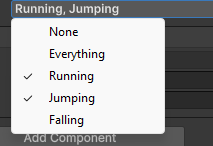
Internally, if Running and Jumping are selected
1
2
3
4
Running = 0010
Jumping = 0100
--------------
state   = 0110
In decimal representation:
1
state = 6
But what really matters is the binary layout.
Working with Flags in Code
To work with the flags in code, we are using the bitwise operations defined before:
1
2
3
4
5
6
7
8
9
10
11
12
13
14
//Combining flags
state = CharacterState.Running | CharacterState.Jumping;

//Checking flag
if ((state & CharacterState.Running) != 0)
{
    // Running is active
}

//Removing a Flag
state = state & ~CharacterState.Running;

//Toggling a Flag
state = state ^ CharacterState.Running;
Important Notes About Unity
[Flags]does not change how the enum works internally. It mainly affects how it is displayed and interpreted.- Unity serializes the enum as an integer
- The maximum number of flags depends on the underlying type (default is
int, which is 32 bits). - If needed, you can specify a different backing type:
1
public enum CharacterState : byte
Flags in Unreal Engine
In Unreal, flags are implemented using C++ enum classes combined with Unreal’s reflection system.
To make an enum usable as a bitmask inside the Editor, two things are required:
- Mark the enum with
UENUM(meta = (Bitflags)) - Use
ENUM_CLASS_FLAGS()macro, to enable bitwise operators for the enum type.
Without this setup, the enum behaves like a normal enumeration. Meaning only one value can be selected in the editor at a time.
Defining a Flags Enum
1
2
3
4
5
6
7
8
9
10
11
UENUM(meta = (Bitflags))
enum class ECharacterState : uint8
{
  None = 0,
  Running = 1 << 0,
  Jumping = 1 << 1,
  Falling = 1 << 2,
  Everything = Running | Jumping | Falling
};

ENUM_CLASS_FLAGS(ECharacterState);
Important details:
None = 0is recommended for a clean “no flags set” state.- Each value is defined using
1 << nto guarantee a unique bit. Everythingis optional but useful for enabling all flags.ENUM_CLASS_FLAGSenables|,&,^,~operators for the enum.- The enum is backed by an integer type (
uint8here, but can beuint32etc.)
Inspector Behaviour
Unlike Unity, Unreal does not store the mask directly as the enum type when exposing it to the Editor.
Instead, we expose an integer property and link it to the enum.
1
2
UPROPERTY(EditAnywhere, meta = (Bitmask, BitmaskEnum = "ECharacterState"))
int32 StateMask;
This tells Unreal:
- Treat
StateMaskas a bitmask - Use
ECharacterStateto define its checkboxes
The editor will render it as a list of checkboxes instead of a raw integer field.
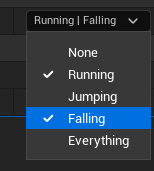
The same metadata can be applied to function parameters:
1
void SomeFunction(UPARAM(meta = (Bitmask, BitmaskEnum = "ECharacterState")) int32 InState)
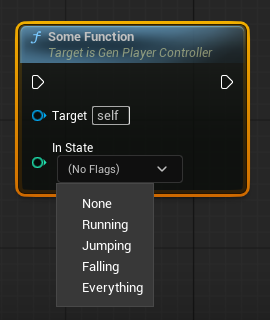
Working with Flags in Code
If we are not exposing the value to the Editor, prefer storing it as the enum type. If we are using the int32 mask exposed to the Editor, we must cast the result of bitwise operations to int32.
1
2
3
4
5
6
7
8
9
10
11
12
13
14
15
16
17
18
19
20
21
22
23
24
25
int32 StateMask;
ECharacterState StateMaskEnum;

//Combining flags
StateMask = StaticCast<int32>(ECharacterState::Running | ECharacterState::Jumping);
StateMaskEnum = ECharacterState::Running | ECharacterState::Jumping;

//Checking flag
if ((StateMask & StaticCast<int32>(ECharacterState::Running)) != 0)
{
    // Running is active
}

if ((StateMaskEnum & ECharacterState::Running) != ECharacterState::None)
{
    // Running is active
}

//Removing a Flag
StateMask = StateMask & StaticCast<int32>(~ECharacterState::Running);
StateMaskEnum = StateMaskEnum & ECharacterState::Jumping;

//Toggling a Flag
StateMask = StateMask ^ StaticCast<int32>(ECharacterState::Running);
StateMaskEnum = StateMaskEnum ^ ECharacterState::Running;
Unreal also provides helper functions for enum flags:
- EnumHasAnyFlags
- EnumHasAllFlags
- EnumAddFlags
- EnumRemoveFlags
These work directly with enum types (not raw int32).
1
2
3
4
5
6
7
8
9
10
11
12
13
14
15
16
17
18
19
20
21
22
23
24
25
int32 StateMask;
ECharacterState StateMaskEnum;

//Combining flags
EnumAddFlags(StaticCast<ECharacterState>(StateMask), ECharacterState::Running | ECharacterState::Jumping);
EnumAddFlags(StateMaskEnum, ECharacterState::Running | ECharacterState::Jumping);

//Checking flag
if (EnumHasAnyFlags(StaticCast<ECharacterState>(StateMask), ECharacterState::Running))
{
    // Running is active
}

if (EnumHasAnyFlags(StateMaskEnum, ECharacterState::Running))
{
    // Running is active
}

//Removing a Flag
EnumRemoveFlags(StaticCast<ECharacterState>(StateMask), ECharacterState::Running);
EnumRemoveFlags(StateMaskEnum, ECharacterState::Running);

//Adding a Flag
EnumAddFlags(StaticCast<ECharacterState>(StateMask), ECharacterState::Running);
EnumAddFlags(StateMaskEnum, ECharacterState::Running);
These helpers improve readability and reduce casting mistakes.
Important Notes About Unreal
- Requires explicit metadata linking enum
- More verbose
- Gives strong integration with reflection and Blueprints
Once configured, flags integrate cleanly into:
- C++
- Blueprints
- Editor UI
- Property System
Practical use cases
Flags are especially useful when multiple independent states must coexist efficiently.
Common real-world scenarios include
- Character movement states
- AI behavior modes
- Input permission masks
- Ability of skill states
- Debug and development toggles
- Multiplayer authority states
Flags are the right solution when:
- Multiple states can be active simultaneously
- States are logically independent
- Fast checks are required
- Memory efficiency matters
- You want compact, composable state representation
If only one state can be active at a time, regular enum (without flags) is usually a better choice.
Common pitfalls
Incorrect enum values
Using values like:
1
1, 2, 3, 4
breaks the system.
Each flag must be a power of two:
1
1, 2, 4, 8, 16, 32,...
Otherwise, bits will overlap and combinations become ambiguous.
Overlapping bits
Two flags using the same bit position cause conflicts:
1
2
Running = 1 << 1;
Jumping = 1 << 1; // wrong
Both values would represent the same bit
Exceeding Bit Width
An integer has a fixed number of bits:
- 32-bit type → up to 32 flags
- 64-bit type → up to 64 flags
Exceeding that limit causes overflow and undefined or unintended behaviour.
Poor Naming
Flags should describe state, not actions.
Good:
- IsRunning
- CanJump
- HasAuthority
Bad:
- StartRunning
- JumpNow
Flags represent conditions, not commands.
Conclusion
Flags are a low-level but powerful technique built on the binary representation of numbers.
They allow multiple independent states to coexist inside a single value while remaining efficient and easy to check.
Because each flag corresponds to a unique power of two, combinations remain unambiguous and safe.
Both most popular engines support this pattern:
- Unreal Engine integrates flags deeply into its reflection system and editor tooling.
- Unity leverages C# enums with the
[Flags]attribute for clean language-level support.
Understanding how binary numbers map to bitflags allow us:
- Better reasoning about state
- Cleaner system design
- Efficient memory usage
- Faster condition checks
- More expressive gameplay logic
Bitflags are straightforward at the hardware level but extremely powerful when applied thoughtfully in game development.
Written by

Comments powered by Disqus.